



Wondering how many nodes or triangles your Surface object consists of? Access this information, and more, by right-clicking on the object > Style Editor > Info.


The information reported is different for each object type, for example Curves report the number of nodes and segments, while Voxets report the number of cells and cell spacing.
The Style Editor also contains all the settings available for changing the visual appearance of objects, property display options, region settings, and much more!
Previous GOCAD Mining Suite tips can be found under the Software tip category in the Resources section and in the Archives section of our website.
Latest news

15 tips in 15 minutes
15 Geoscience ANALYST tips on advanced visualization and knowledge sharing...

Reopening selected commands
In GOCAD Mining Suite the Log and Command Messages panel has a new tool to reopen previously executed commands...
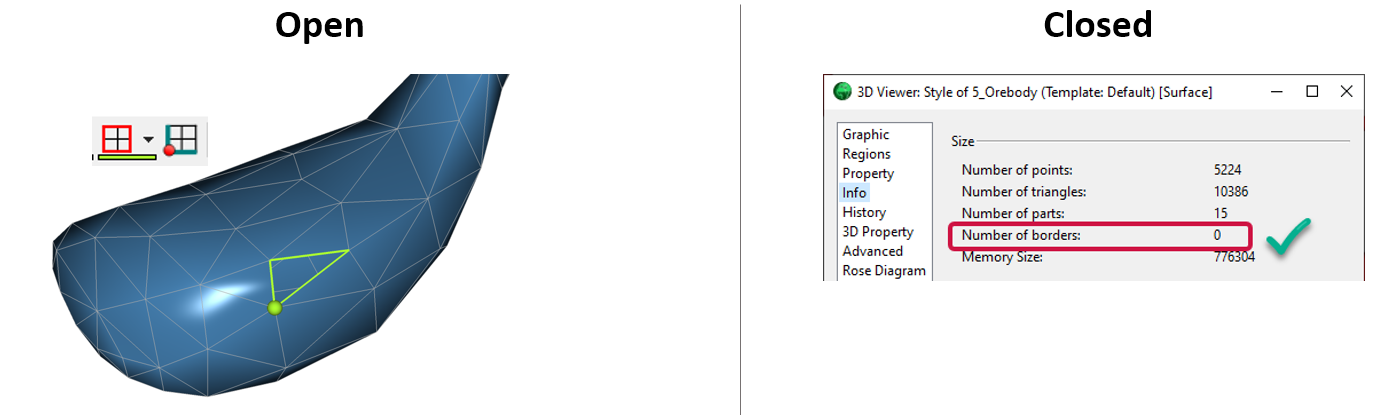
Is the surface opened or closed?
In GOCAD Mining Suite you can easily know if your surface is opened or closed by...

Cloning import templates
In Geoscience INTEGRATOR, cloning an import template provides a ready-to-edit copy without having to build a new one from scratch...

Using ioGAS in Geoscience ANALYST Pro – Virtual Lecture
Past event, recording available here...

Geoscience ANALYST Pro Geophysics Consortium
Focused on delivering software and methods that make the use of advanced geophysics a day-to-day, practical reality for industry.

Importing objects from project
In GOCAD Mining Suite you can easily import objects from one GOCAD project to another by...

Editing property transparency
In GOCAD Mining Suite, when you select a property its transparency can be edited...

Searching in the objects tree
Having trouble finding one object out of hundreds in Geoscience ANALYST? Try searching your Objects panel (Ctrl+F)...

Women Geoscientists in Canada
We are proud sponsors of WGC, advocates for increased gender balance within geosciences...

Including water bodies in gravity and magnetic inversion modelling – Geoscience ANALYST Pro Geophysics
Thomas Campagne demonstrated how to explicitly include bathymetry in inversion modelling of near-shore gravity data...

Mira Geoscience Partners with Tessael to Advance Geological Modelling in Geoscience ANALYST
Capture geological observations quickly, safely, and accurately, both in the field and office with HiveMap...