Geoscience ANALYST Open Training

Build practical skills in Geoscience ANALYST through instructor-led open training sessions designed for geoscientists working with multidisciplinary data.

Whether you are getting started or expanding your capabilities, our open training gives you structured, hands-on learning you can immediately apply to your projects.

Upcoming Open Training Sessions

Geoscience ANALYST Pro Fundamentals | June 10-11, 2026

Build a strong foundation in geophysical data analysis and interpretation with the Geoscience ANALYST Pro Fundamentals course. This training covers essential workflows, including data import and management, visualization of multi-parameter datasets, and the integration of geoscience data in 2D and 3D environments. Participants will gain hands-on experience with core tools for processing, modelling, and interpreting geophysical data, enabling them to extract meaningful insights and support more informed exploration decisions.

Course Content

DAY 1:
Build a strong foundation by building a basemap, integrating surface datasets and introducing subsurface context in a unified visual environment. Participants will:
  • Set up a base map using topography, imagery, and GIS layers
  • Import and validate geochemical and structural datasets
  • Use visualization, filtering, and classification to highlight key patterns
  • Integrate and grid geophysical data
  • Introduce and visually validate drillhole and geological model data in 3D

By the end of day 1, participants will understand how to prepare, visualize, and inspect integrated datasets.

DAY 2: 
Build on the visual foundation to measure relationships between datasets and support exploration decisions. Participants will:
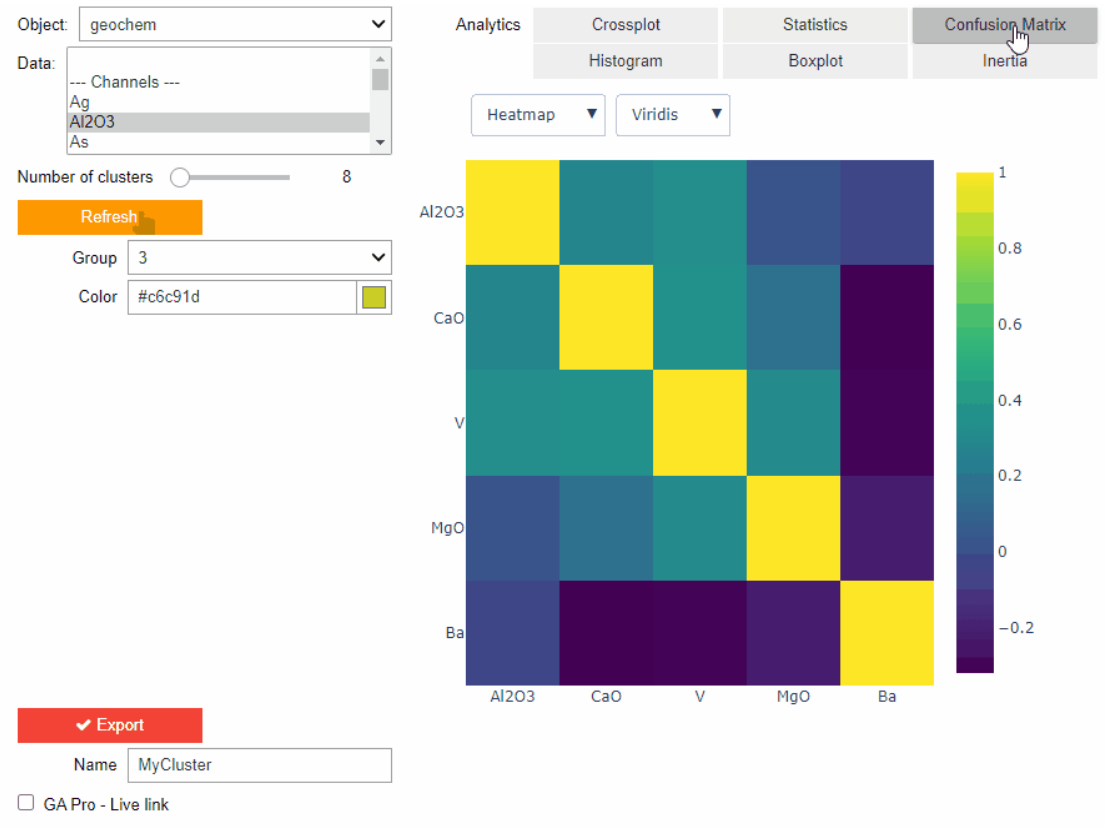
  • Compare geochemical, geophysical, and geological data using cross plots and statistical tools
  • Use distance-based analysis to evaluate spatial relationships
  • Transfer and integrate data across surfaces, drillholes, and block models
  • Interpolate drillholes data to build continuous subsurface models
  • Combine multiple data layers to highlight areas of interest for further investigation

By the end of day 2, participants will be able to construct, visualize, and compare quantitative relationships between the datasets prepared during day 1.

Prerequisites

  • Basic knowledge of Geoscience ANALYST (3D viewer) is required
  • Basic understanding of geoscience concepts is also recommended

Additional Information

Duration:

  • 4 hours (2 hours x 2 days)

Session Breakdown:

  • Day 1: Wednesday, June 10 | 10 AM – 12 PM (Pacific Time)
  • Day 2: Thursday, June 11 | 10 AM – 12 PM (Pacific Time)

Instructor:

  • Samuel Tyler, P.Geo, Geological Software Specialist at Mira Geoscience

Delivery Format:

  • Live instructor-led sessions delivered via Microsoft Teams
  • Includes hands-on exercises and guided workflows

Cost:

  • $200 USD*

(*) Major and mid-tier sponsors of the Geoscience ANALYST Consortia (Pro Geophysics and/or Pro Geology) may register for this training at no cost by using 4 hours from their consortium allocation.

What is Open Training?

Open training sessions are public, scheduled courses that anyone can join.

  • Learn alongside other professionals
  • Follow a structured curriculum
  • Gain hands-on experience guided by experts
  • Access training without needing a full team commitment

These sessions are ideal for individuals or small groups looking to build skills efficiently.

At this time, all open training sessions are delivered virtually via Microsoft Teams.

Why Attend?

Modern geoscience workflows require integrating and interpreting complex datasets quickly and confidently.

Our open training helps you:

  • Work more efficiently with your data
  • Build confidence in interpretation workflows
  • Understand best practices used by industry professionals
  • Reduce time spent troubleshooting and trial-and-error

These sessions are ideal for individuals or small groups looking to build skills efficiently.

What You Can Expect?

Each session is designed to be practical, interactive, and immediately useful.

  • Hands-On Learning. Work directly in the platform with guided exercises and real-world examples.
  • Expert Instruction. Learn from our technical experts at Mira Geoscience, who understand both the software and the geoscience context.
  • Structured Progression. Courses are designed to take you from foundational concepts to applied workflows.
  • Collaborative Environment. Engage with other users, ask questions, and learn from shared challenges.

Who Should Attend?

Open training is ideal for:

  • Geoscientists new to Geoscience ANALYST
  • Professionals looking to refresh or strengthen workflows
  • Individuals without access to internal training
  • Teams wanting to train a few members before scaling

Looking for Tailored Training?

If you are looking for training tailored to your team—or the schedule doesn’t match your availability—you can explore our custom training options.

Please contact our team for additional information about our products and services

Related news

April, 21 2022

Extending workflows with rapid model generation – Virtual Lecture

Past event - Shaun O'Connor showed how to use the built-in scripting tools for exploratory geological modelling with sparse data...
Read more
GOCAD Mining Suite
April, 08 2021

GOCAD Mining Suite – A geological modelling powerhouse

Past event, recording link available here...
Read more
June, 01 2021

Import geoh5 into GOCAD Mining Suite

Seamlessly go between GOCAD Mining Suite and Geoscience ANALYST...
Read more
Q&As
July, 26 2021

Q&A: Revival Gold Inc.

We discussed Mira Geoscience’s contribution to further understand the Beartrack-Arnett gold project area using modern exploration techniques...
Read more
July, 13 2022

Monitoring folders

Geoscience INTEGRATOR's monitoring folders can be used to automatically import files to a project to save time and streamline regular updates.
Read more
Geoscience ANALYST
December, 01 2021

EM101: Tips and tricks for EM data in Geoscience ANALYST

In 20 minutes, James Reid show's you EM101 using Geoscience ANALYST Pro, a low-cost...
Read more
Geoscience ANALYST
February, 10 2022

Crustal scale gravity modelling and isostatic correction over central Chile

View recording - Thomas demonstrates how to apply an isostatic correction to gravity data through a case study over central Chile using...
Read more
Case studies
September, 15 2025

Revolutionizing Subsurface Interpretation and 3D Visualization with Geoscience ANALYST Pro

Discover how EnBW is bridging the gap between 2D mapping, 3D seismic interpretation, and integrated geophysical workflows
Read more
Geoscience ANALYST
September, 23 2021

Including water bodies in gravity and magnetic inversion modelling – Geoscience ANALYST Pro Geophysics

Thomas Campagne demonstrated how to explicitly include bathymetry in inversion modelling of near-shore gravity data...
Read more
May, 01 2022

Drape Voxet properties on surfaces

In GOCAD Mining Suite you can texturally drape your images and 2D gridded data onto surfaces, for example...
Read more
October, 15 2019

Used v/s available themes

In Geoscience INTEGRATOR, the Theme drop down menu shows a filtered list of those containing data sets by default...
Read more
January, 05 2021

Copying drillholes in a grid pattern

In Geoscience ANALYST you can copy an existing drillhole’s collar and deviation in a grid pattern to map a mineralized horizon...
Read more