



The display template is used to group properties that share the same display styles such as colormap, high clip, low clip, and transparency.
When a property is created, a default display template is generated for the property name. Any subsequent property created with the same name on another object will have the same display template. Changes made to the property’s style will be reflected on all the properties sharing display templates.
- To view or edit display settings, right-click on the property and select Style Editor
- To view the objects sharing the same display template, right-click on the property, select Edit Property Settings > View Members
- To remove a property from a display template, simply enter a new display template in the Edit Property Settings dialog box

Previous tips can be found under the Software tip category in the News section and in the Archives section of our website.
Latest news

Tagging query results
In Geoscience INTEGRATOR, this allows you to rapidly access that subset of objects. Instead of having to search and select multiple filters every time...

Using ioGAS in Geoscience ANALYST Pro – Virtual Lecture
Past event, recording available here...

Q&A: Revival Gold Inc.
We discussed Mira Geoscience’s contribution to further understand the Beartrack-Arnett gold project area using modern exploration techniques...

Operations on multiple files
In Geoscience INTEGRATOR, you can carry out various operations on multiple files simultaneously...

Drillhole data interpretation – Geoscience ANALYST free viewer and Python
Past event, link to the recording is available here...

New release – Geoscience INTEGRATOR 3.9
This version includes new functionality to provide a better user experience, such as: user notifications, new display options, and more!

Search for Objects – find anything, anywhere, anytime
In GOCAD Mining Suite find any objects you're looking for in no time...

ODBC drillhole import
In Geoscience ANALYST you can import drillholes straight from your ODBC database...

GOCAD Mining Suite – A geological modelling powerhouse
Past event, recording link available here...
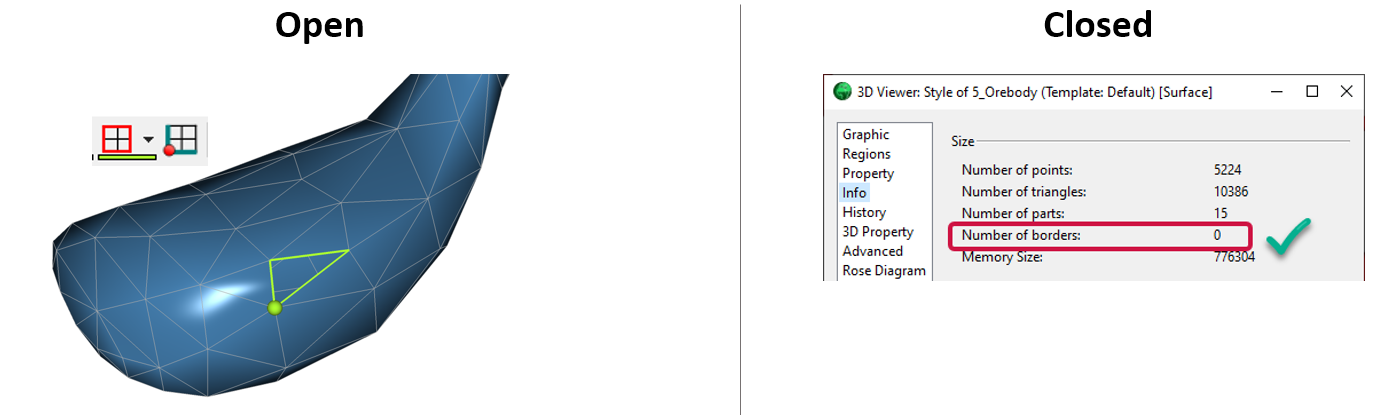
Is the surface opened or closed?
In GOCAD Mining Suite you can easily know if your surface is opened or closed by...

No-data values on import templates
In Geoscience INTEGRATOR, you can prevent importing no-data value strings by providing a general NDV to be applied to all properties of the template...

Mira Geoscience Partners with Tessael to Advance Geological Modelling in Geoscience ANALYST
Capture geological observations quickly, safely, and accurately, both in the field and office with HiveMap...