



In the Properties browser, objects are grouped by the properties they contain. This makes it easier to display a property for one, multiple, or all objects. This can save a lot of time spent browsing through the different objects’ properties and improve your property display efficiency.

Previous tips can be found under the Software tip category in the News section and in the Archives section of our website.
Latest news

Monitoring folders
Geoscience INTEGRATOR's monitoring folders can be used to automatically import files to a project to save time and streamline regular updates.

Arbitrary sections
In Geoscience ANALYST visualize your block model in any direction with the new arbitrary section

A robust workflow for regional porphyry targeting; Application to the QUEST-South project area in southern British Columbia
Mitigating data science and statistical challenges is crucial to integrate machine learning into the everyday targeting tasks of exploration geologists.

Scripting
In Geoscience ANALYST Pro the Script on Object Property utility in Geoscience ANALYST Pro can be used in a wide variety of geoscientific applications...


Reshape using spiderwebs
GOCAD Mining Suite v19 allows you to reshape your surfaces and 2D Grids with a spiderweb editing tool...

Importing and preparing DC/IP data for inversion with Geoscience ANALYST – Virtual Lecture
In 20 mins, Kristofer shows v3.4 new functionality for pre-processing and visualization of DC/IP 2D and 3D data - Geoscience ANALYST...

Depth-to-basement inversion using geometry and homogeneous VPmg inversion
Past event - View here or on our YouTube channel...
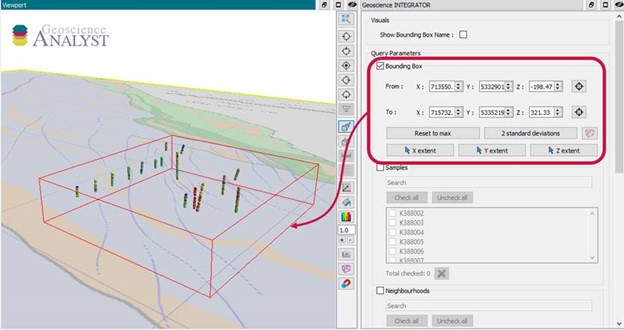
Automatic calculation of XYZ for drillhole sample location
In Geoscience INTEGRATOR, drillhole sample locations are automatically computed as XYZ by the system from the deviation surveys...

Filtering samples by their drillhole
In Geoscience INTEGRATOR, you can can filter them according to the drillhole they are located in...

Day interval filters
In Geoscience INTEGRATOR the Day interval filter can be used to search your time-based data for “the last X days”, or...

Search for data by spatial extent
This video shows you how to search for data from Geoscience INTEGRATOR by spatial extent...