Coffee break… and learn!
Like this video? Go to our YouTube Channel for more!

In this lecture, Kristofer Davis will show how to run potential-field 3D inversions and forward modelling in Geoscience ANALYST Pro using VPmg. This allows each model cell to know both its rock type and physical properties for geological constraints.

In 15 minutes learn how to:

  • Import a geological model and data
  • Create a 3D geophysical model in terms of geologic domains
  • Invert for bulk density
  • Review results and discuss further options for inversion to reproduce the data
  • Forward model susceptibility to see if the model makes sense (just because!)

This episode, along with Free Viewer and data, is available on demand via our website and YouTube CHannel. More details about this series can be found on our Events page or join the mailing list.

Kristofer is a Scientific Programmer who completed his PhD in Geophysics at the Colorado School of Mines. As a Post-Doctoral Researcher at UBC he worked on several advanced problems in geophysical inversion, focusing, amongst other research areas, on development of software workflows to support constrained geophysical inversion. His industry and academic background provide the ideal experience to continue development of our VP Suite products, GIFtools, and our other geophysical tools and workflows. Kristofer is based in Vancouver.

Latest events and news

Q&As
August, 16 2024

Q&A with Oleg Brovko, Senior Project Geophysicist at Geofocus

Join us in this exciting conversation with Oleg Brovko on harnessing Geoscience ANALYST and open-source technology for advanced geophysical solutions
Read more
November, 09 2020

Default data colour settings

In Geoscience ANALYST you can set a default colour table and colour mapping transformation function. This way, when you import or create new data, it will be coloured by default.
Read more
January, 13 2022

New raster imports

In Geoscience ANALYST you can now import GeoTIFF (tif, tiff), ERMapper (ers), and Surfer (grd)... ..
Read more
GOCAD Mining Suite
April, 08 2021

GOCAD Mining Suite – A geological modelling powerhouse

Past event, recording link available here...
Read more
Company news
January, 03 2024

25 years modelling the earth together

Dedicated to driving technological innovation and excellence in the realm of geoscience. Your success is at the heart of everything we do.
Read more
How-to videos
January, 24 2022

Creating 3D geological starting model from geological maps and structural measurements

In this lecture, Philippe generates a 3D geological model from a map with structural measurements in Geoscience ANALYST...
Read more
Software tips
November, 02 2020

Taskbar icons

In GOCAD Mining Suite, icons are added to the taskbar when you open windows such as another 3D Viewer or the 3D-GIS Query panel...
Read more
How-to videos
December, 07 2021

Importing and preparing DC/IP data for inversion with Geoscience ANALYST – Virtual Lecture

In 20 mins, Kristofer shows v3.4 new functionality for pre-processing and visualization of DC/IP 2D and 3D data - Geoscience ANALYST...
Read more
January, 25 2021

Display multiple Voxet sections

In GOCAD Mining Suite, you can create additional sections, hide/show them, use the slider and arrow to position them along the Voxet, and delete them...
Read more
February, 10 2021

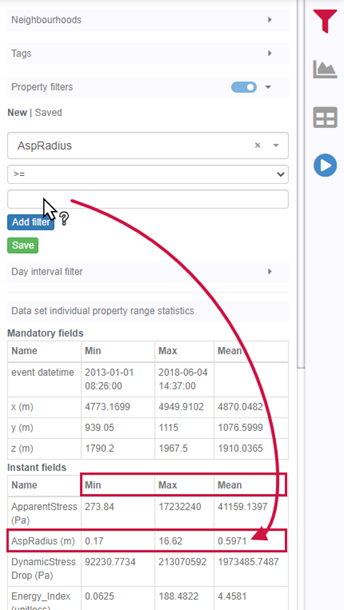
Property value range

In Geoscience INTEGRATOR, You can refer to the range of values in the query panel to apply numeric property filters...
Read more
August, 16 2021

Automatic calculation of XYZ for drillhole sample location

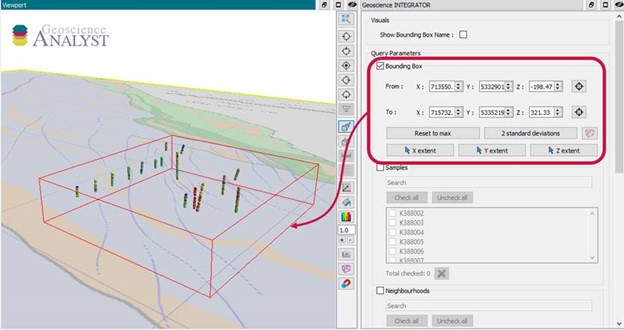
In Geoscience INTEGRATOR, drillhole sample locations are automatically computed as XYZ by the system from the deviation surveys...
Read more
December, 14 2020

Tagging query results

In Geoscience INTEGRATOR, this allows you to rapidly access that subset of objects. Instead of having to search and select multiple filters every time...
Read more

Please contact our team for additional information about our products and services