



In the Preferences window (File > Preferences), you can set the Viewport direction labels to any text you want, like xyz, or Easting, Northing, and Elevation. The labels will update in the axis on the bottom right corner of the 3D and 2D Viewports.

Previous tips can be found under the Software tip category in our News page and in our Archives page.
Latest news

Q&A with Oleg Brovko, Senior Project Geophysicist at Geofocus
Join us in this exciting conversation with Oleg Brovko on harnessing Geoscience ANALYST and open-source technology for advanced geophysical solutions

Operations on array properties
In GOCAD, this command, found in the Property menu, allows the user to perform various operations (scaling, DC shift...

Earth model’s themes are renamed
In Geoscience INTEGRATOR v3.7, the “Earth models” theme group is renamed “Models, maps and sections” and the theme’s names were...

Tabular property viewer
In GOCAD Mining Suite you can view your object’s properties in a tabular format with the Tabular Property Viewer...

Labelling
In Geoscience ANALYST, labels can be added to draw attention to a particular feature in the Viewport by...

Saving views/scenes
You can save up to 10 custom views in Geoscience ANALYST by pressing Ctrl-F(1-10) with the option...

Python applications for geoscientific problems
geoh5py and geoapps - Open format, open source code, and open licensed data! Cannot get any better than that!

Filtering samples by their drillhole
In Geoscience INTEGRATOR, you can can filter them according to the drillhole they are located in...

How to run gravity inversions in a geologically driven way
Past event, view here or on our YouTube Channel to see how to run a 3D inversion and forward modelling in Geoscience ANALYST Pro using VPmg...

Peak finder – Geoscience ANALYST geoapps: Python application
Past event. Link to recording available here.
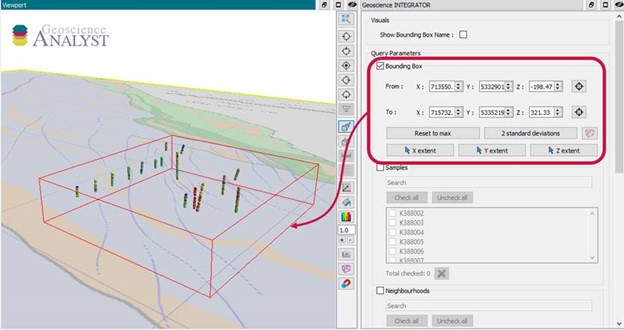
Automatic calculation of XYZ for drillhole sample location
In Geoscience INTEGRATOR, drillhole sample locations are automatically computed as XYZ by the system from the deviation surveys...

Macros
In GOCAD Mining Suite you can save lots of time with SKUA-GOCAD’s macros, a built-in scripting tool in which you can record or enter a sequence of commands to carry out or repeat at any time...